How to use an AI-assistant workflow to do background research for a news story
As a data journalist, you often find yourself working on a topic you know very little about: a highly technical issue or a field that requires specialized knowledge. Before reaching out to experts for interviews, building up some background knowledge through research can help you ask better-informed questions and make the conversation smoother and more productive.
You could query a search engine, plunge into library archives, or read academic papers, and then summarize the key information and organize everything you’ve collected. For more advanced research, coding might be needed for scraping or to speed up bulk work.
But now with an automated AI workflow, no code is needed. That gives you a faster way to get an outcome and the workflow you create will be reproducible for the next project. One solution I’ve used is StackAI. It lets me build a workflow by connecting different tools together, and run it with a click once the sequence is set up.
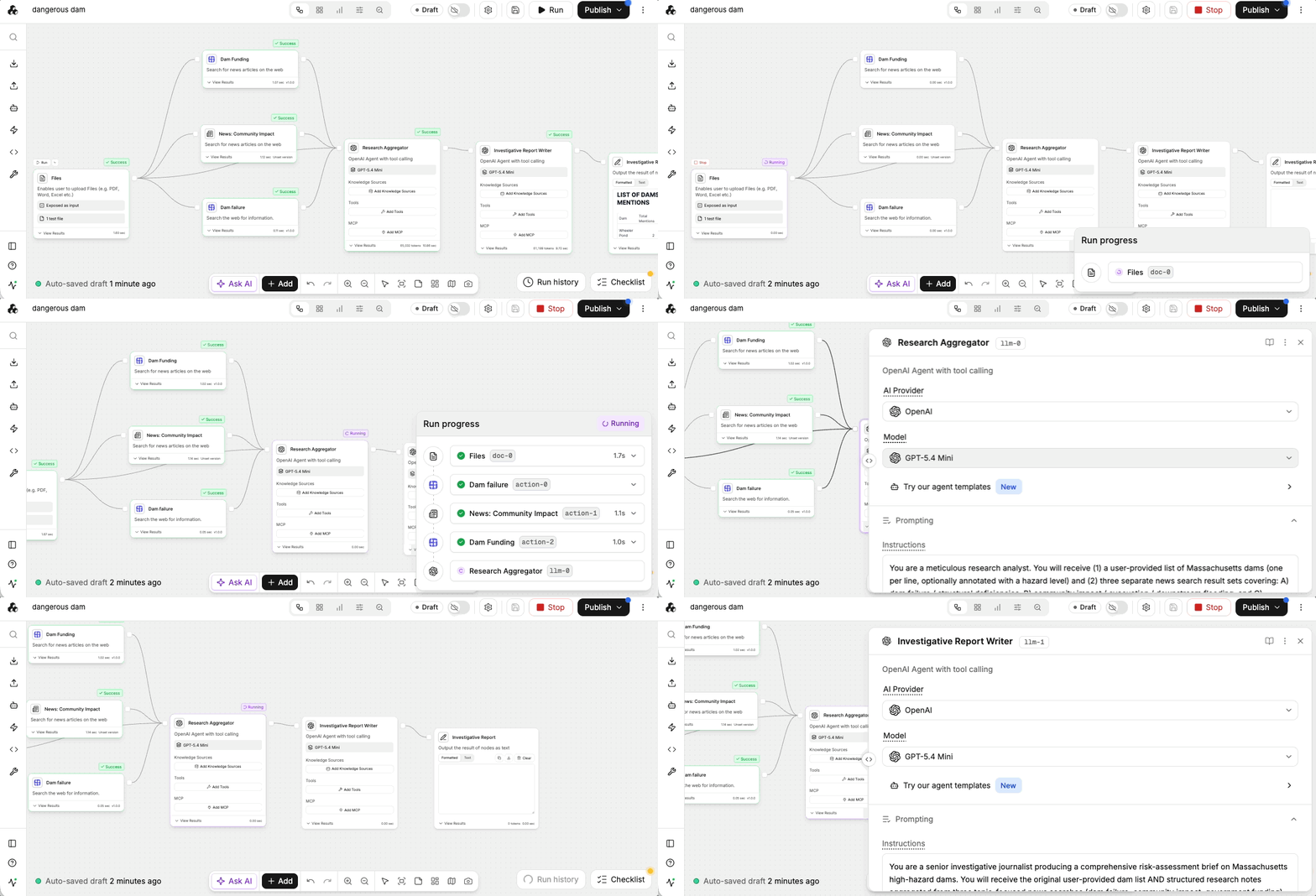
I recently investigated high-hazard dams in Massachusetts for a project in my Open-Source Investigation class later published by WBUR. As a newcomer to the state, I needed to quickly get up to speed on the issues people care about most and how they’ve been covered by local news.
I started with a list of dam names as a test and built a workflow that searched for past news coverage, government reports, and policy discussions related to each dam. The workflow then organized the results into a research summary, with themes such as dam safety, infrastructure funding, flooding risks, and previous incidents – it works well as an initial kick-off. (See the research summary by StackAI.)
Getting started: Breaking down my workflow
The StackAI workflow is task based, with each node conducting a certain task – reading files, calling an LLM, web scraping, summarizing etc. First, I roughly broke the research process into a series of smaller tasks:
- Generate a list of high-hazard dam names.
- Search news archives for each dam.
- Classify stories by topic.
- Summarize patterns and potential leads across all reporting.
In StackAI, the workflow looked something like this:
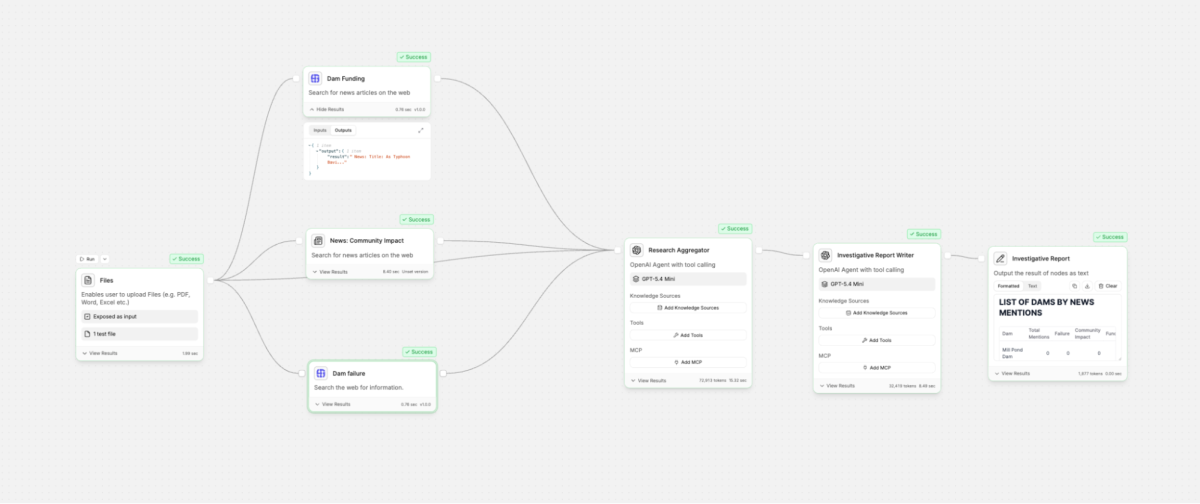
How Node Works
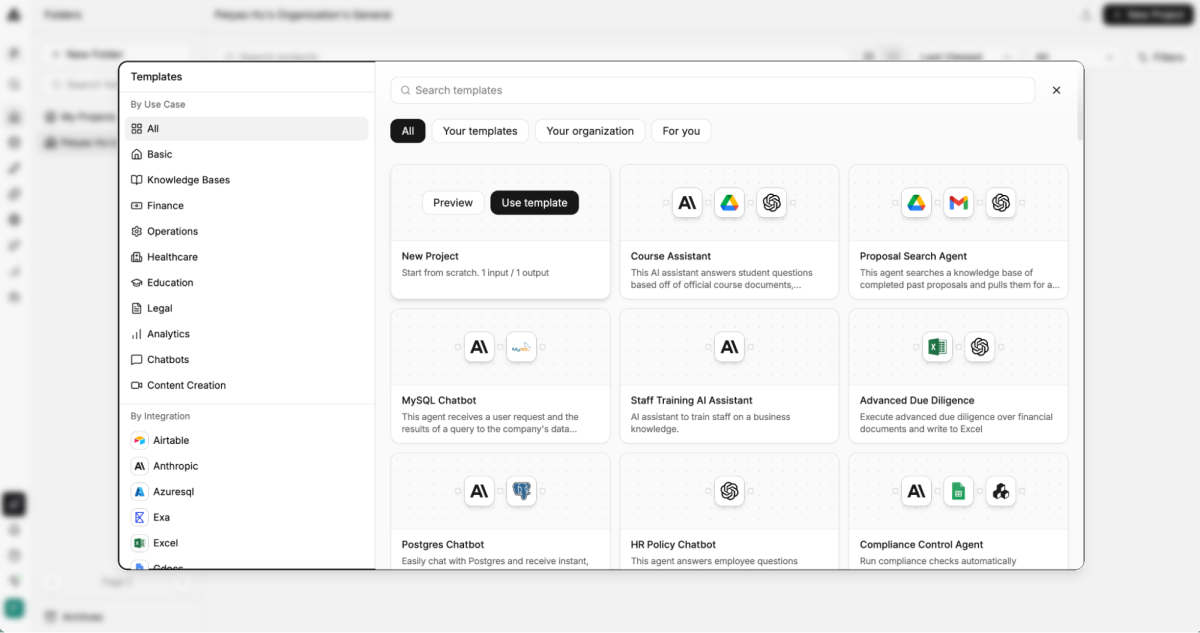
StackAI provides different templates for different uses – there are some analysis/search templates built in, but my news research task was more customized so I decided to start with a “New Project.”
1. Input Node
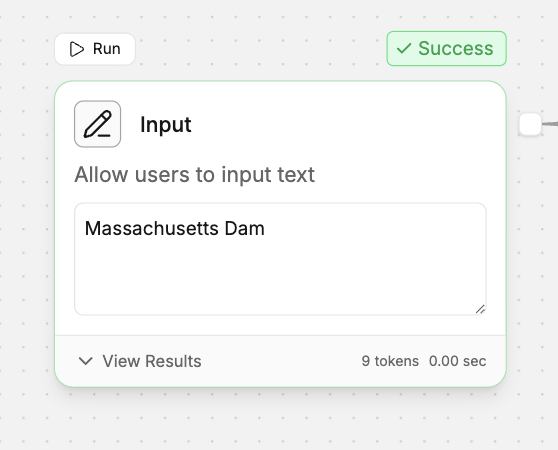
I started with an input node with a simple object, “Massachusetts Dam,” to make things easier to run. After I got more familiar with the tool, I used file node to extend the research scope to a list of thousands of high-hazard dams across the state.
Tips
- Start with a small dataset when building a new workflow. It’s much easier to identify problems.
- Before moving on to the next node, check that the Input node is actually passing the expected text forward. A simple Text Output node can help verify what the next step is receiving.
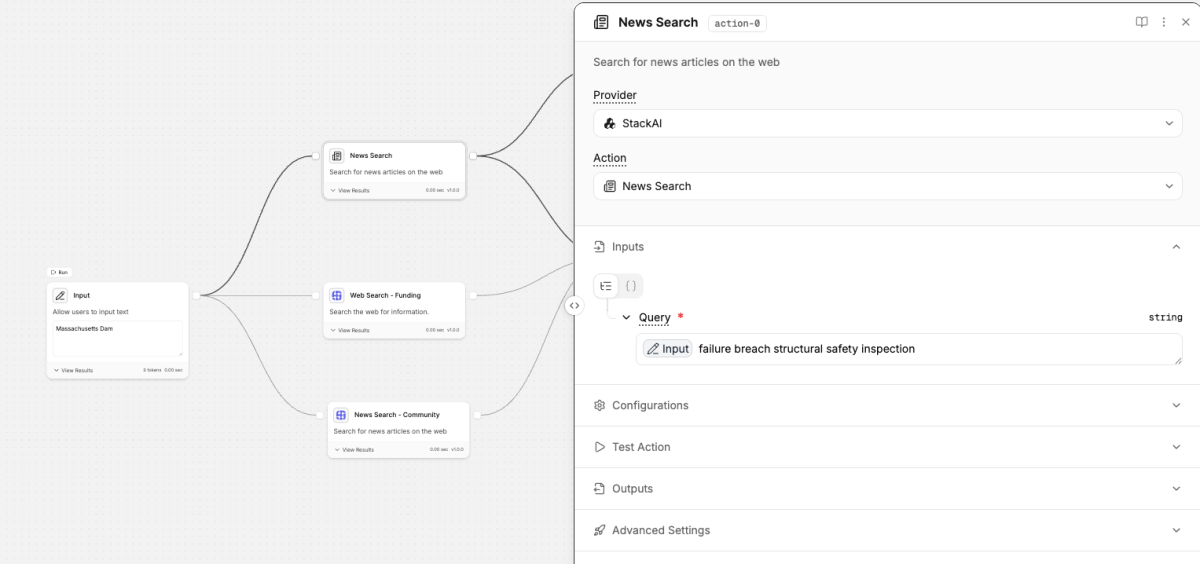
2. News Search Node
The News Search node retrieves articles related to each search query. I used three different scraping providers, StackAI’s news search for funding/budget/legislation side, with a combination of SerpAPI’s news search for dam failure/incident/collapse and web search for community impact, just to diversify the coverage source. You can also set up news research location, country and language in the configurations section, and run a test to see the search results using the Test Action before proceeding to the next node.
Input
Dam Failure Query: failure breach structural safety inspection
Dam Funding Query: funding legislation budget grants
Community Impact Query: community impact property environmental
Search engines tend to work best with concise keyword-based queries instead of long sentences, which often return fewer relevant results because news search engines rely primarily on keywords. Keep search queries short and focused.
For example:
Less effective
Search for news reporting related to Hill Reservoir Dam and Massachusetts government policy, regulations, inspections, funding, flooding, property damage…
More effective
Hill Reservoir Dam safety inspection flooding
Tips
- If the search results seem unrelated to your topic, first verify the exact query being sent to the search engine. Adding a temporary Text Output node is an easy way to inspect it.
- Testing a node individually doesn’t always reflect how it runs in the full workflow. Run the complete workflow to make sure each node receives the expected input.
2. LLM Node – Research Aggregator
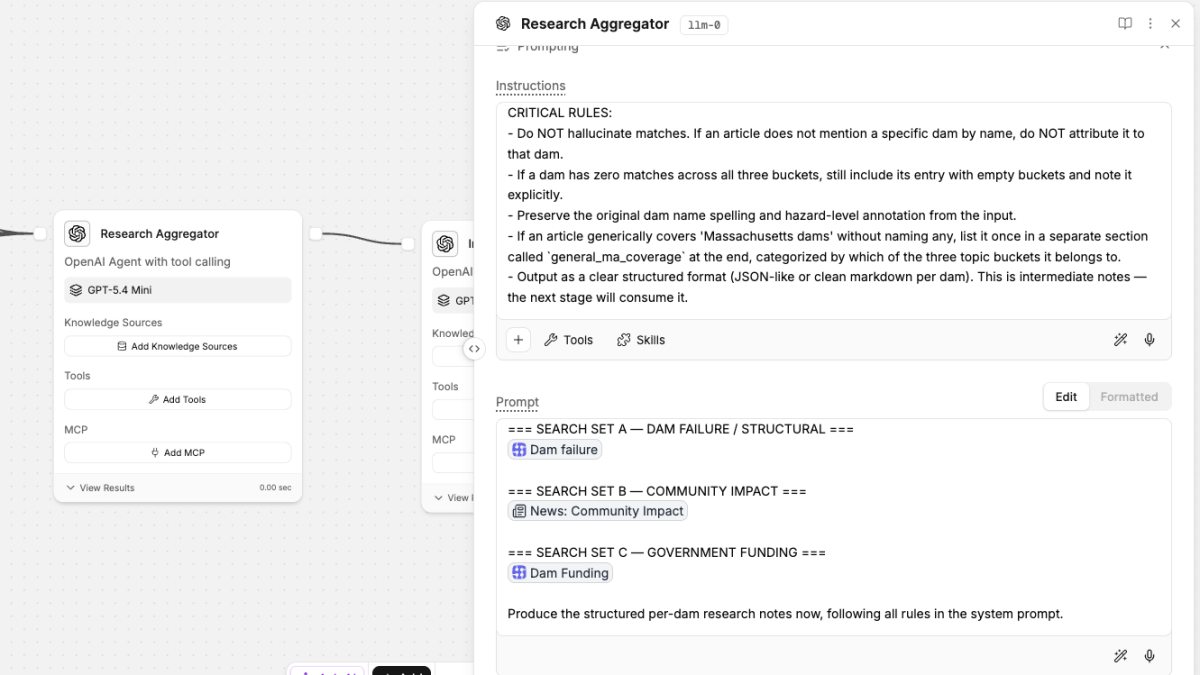
The outcomes of the news scrape node are often noisy. If your first input node is more complicated than just a word – let’s say a CSV file, everything would be tangled together, including source links, long text that you just want to skip, or even stories loosely related to the topic. The LLM node helps format the results by extracting key information.
Instructions:
You are a meticulous research analyst. You will receive
(1) a user-provided list of Massachusetts dams (one per line, optionally annotated with a hazard level) and
(2) three separate news search result sets covering: A) dam failure / structural deficiencies, B) community impact / evacuation / downstream flooding, and C) government funding / repair / rehabilitation.


Your job: produce structured intermediate research notes keyed by dam name. For every dam that appears in the input list, output an entry with three sub-buckets: dam_failure, community_impact, government_funding. Under each bucket, list every article that EXPLICITLY references that specific dam by name (or an unambiguous alias).
For each article, include: title, publication/source, date (if available), URL (if available), and a 1-2 line factual summary tied to that dam.


CRITICAL RULES:
- Do NOT hallucinate matches. If an article does not mention a specific dam by name, do NOT attribute it to that dam.
- If a dam has zero matches across all three buckets, still include its entry with empty buckets and note it explicitly.
- Preserve the original dam name spelling and hazard-level annotation from the input.
- If an article generically covers 'Massachusetts dams' without naming any, list it once in a separate section called `general_ma_coverage` at the end, categorized by which of the three topic buckets it belongs to.
- Output as a clear structured format (JSON-like or clean markdown per dam). This is intermediate notes -- the next stage will consume it.
Prompt:
USER-PROVIDED DAM LIST:
=== SEARCH SET A -- DAM FAILURE / STRUCTURAL ===
=== SEARCH SET B -- COMMUNITY IMPACT ===
=== SEARCH SET C -- GOVERNMENT FUNDING ===
Produce the structured per-dam research notes now, following all rules in the system prompt.
Tips
- I was using the free GPT-5.4 Mini model, but for longer summaries or research reports, it may exceed the model’s maximum output length. Connecting your own LLM account allows models with higher output limits.
3. LLM Node – Investigative Report Writer
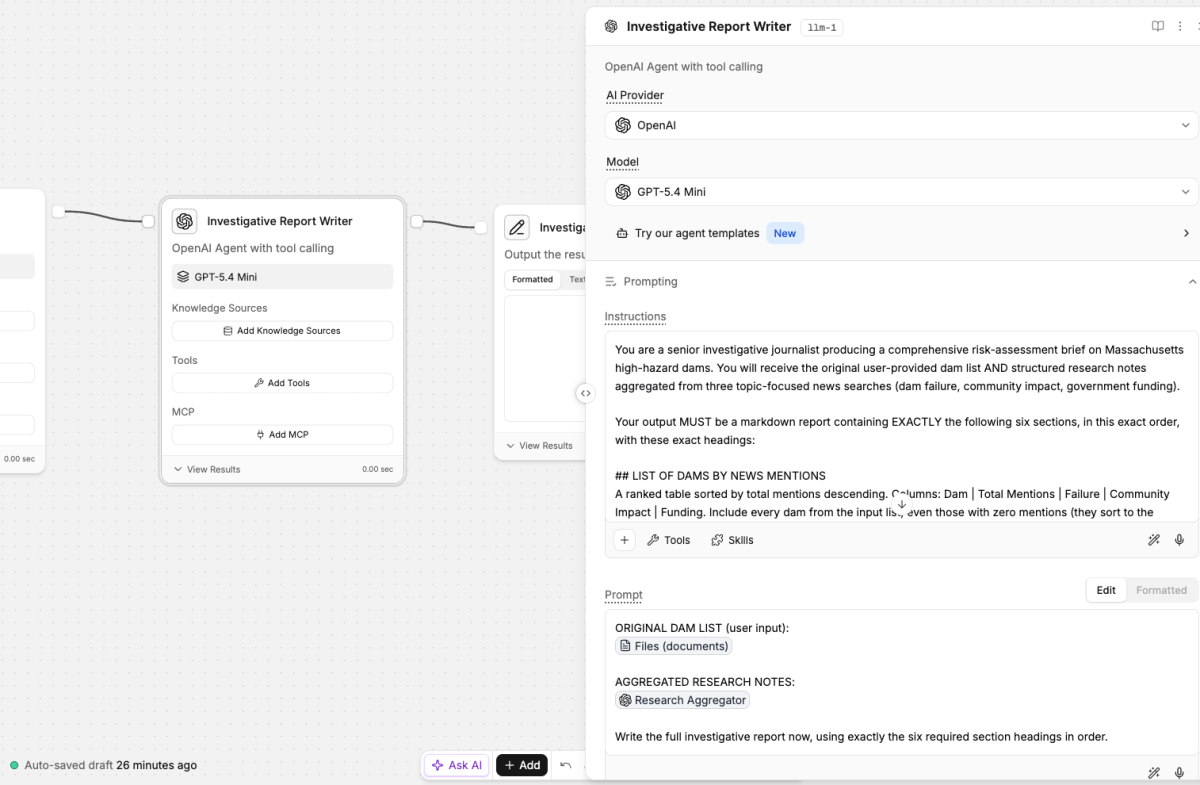
The last node synthesizes all of the formatted news articles into a research memo. Since my goal was to figure out which dams were newsworthy so I could invest in deep investigation of a small number out of high hazard dams out of thousands of dams in Massachusetts, this LLM is set to analyze the collected coverage and identifies dams with news potential—either those that have drawn extensive media attention, or those that have been under-covered.
Instructions:
You are a senior investigative journalist producing a comprehensive risk-assessment brief on Massachusetts high-hazard dams. You will receive the original user-provided dam list AND structured research notes aggregated from three topic-focused news searches (dam failure, community impact, government funding).
Your output MUST be a markdown report containing the following six sections with these exact headings:

## LIST OF DAMS BY NEWS MENTIONS
A ranked table sorted by total mentions descending. Columns: Dam | Total Mentions | Failure | Community Impact | Funding. Include every dam from the input list, even those with zero mentions (they sort to the bottom).
## DETAILED BREAKDOWN OF DAMS IN NEWS
For each dam that had at least one mention, a per-dam narrative section. Use the dam name as a subheading (### Dam Name). Summarize what the coverage says, and cite specific articles inline as [Title -- Source, Date]. Group findings by topic bucket when useful.
## COVERAGE BY HAZARD LEVEL
If the input list includes hazard-level annotations, aggregate total mentions grouped by hazard level (e.g. High Hazard: N mentions across M dams; Significant Hazard: ...). If no hazard levels were provided, state that explicitly.
## DAMS WITH NO COVERAGE
An explicit bulleted list of every dam from the input list that had zero mentions across all three topic buckets. If all dams had coverage, state that explicitly.
## KEY PATTERNS
Cross-cutting themes observed across the coverage: geographic clusters, funding gaps or windfalls, repeated actors (state agencies, contractors, legislators), timeline clusters, recurring failure modes. Be analytical, not just descriptive.
## INVESTIGATIVE LEADS
Concrete follow-up angles for a reporter: specific FOIA targets (agency + record type), individuals or organizations to contact, unanswered questions raised by the coverage, data gaps worth pursuing. Be specific and actionable.
RULES:
- Do NOT fabricate articles, dates, sources, or dam names. Only use what appears in the aggregated research notes.
- If a section has no data, state that explicitly under the heading -- do NOT skip the heading.
- Preserve the exact section headings above (a downstream parser depends on them).
- Cite articles inline; do not invent URLs.
Prompt:
ORIGINAL DAM LIST (user input):
AGGREGATED RESEARCH NOTES:
Write the full investigative report now, using exactly the six required section headings in order.
Tips:
- One feature I found especially helpful was the built-in AI assistant, which can help troubleshoot errors and suggest fixes when the workflow doesn’t run as expected.
AI-assisted workflow has its own limitations: AI summaries should always be verified against the original sources. But the exciting part is that a multi-task research like this, which used to require analysis, APIs, and a fair amount of coding, is now within reach for more people. In addition to StackAI, there are quite a few similar automatic workflow build-up tools, such as n8n, Dify, Flowise. Try and see how they can fit into your own work!